Lab#
Join the lab queue Canvas Assignments
The lab contains mandatory components! To pass the course, you need to complete and hand-in, during an in-person lab interview both mandatory lab assignments A1: Chat Client and A2: TCP Trace Analysis, before the deadline.
Failing to do so will result in failing the course, regardless of your performance on the theoretical part of the course (i.e., the lectures and the written exam).
In the Labs, you will learn how to apply theoretical concepts learned in class and book into practice. The lab assignments consist of network programming exercises, where you will implement various network applications and analyze network traces. Completing the mandatory lab assignments is rewarded with the ability to pass the course and a total of 500 points that will be added to your final score. Completing any of the optional lab assignments is rewarded with up to 1,000 points, depending on the difficulty of the assignment. Additional points are rewarded in the labs for exceptional academic behavior.
In short, the lab component is highly rewarding, but also employing a steeper learning curve than the theoretical part of the course, therefore requiring a significant time investment and dedication to complete the assignments on time.
The overall process of participating in the lab looks as follows:
graph LR
A[Sign Up] --> B[Work on assignment]
B --> C[Ask for help]
C --> B
B --> D[Assignment Sign-off]
D --> B
- Signing up for the lab implies joining a group on Canvas, under the people tab. You may (and are encouraged to) attend any lab session, but you will only receive priority support during the lab session you are registered for. You may not change your registration after the first week of the course.
- You can work on an assignment at any time. Agree with your teammate when to get together to work on your assignments, or set up your own schedule if you are working alone.
- You can ask for help during the lab sessions. The lab sessions are weekly 4-hour on-campus sessions where you can work on your assignments and ask TAs for help with the lab.
- Get your assignment signed off by one of the TAs when you are done. You (and your teammate, both) need to be present on campus and discuss your work with a TA. You pass the assignment only if the TA marks both the code and the interview as sufficient.
Lab Rules#
You may work on the lab assignments in groups of up to two students. You may only change groups after finishing both mandatory lab assignments; for each optional lab assignment you may choose to work in a different group. Note that you are allowed to work alone on the lab assignments, but you must expect a significantly higher workload, which may make it difficult to finish the mandatory assignments on time.
In order to work in a group, you and your teammate must be registered for the same lab session. Groups that are not registered in the same lab session will not be allowed to sign-off their assignments, inherently leading to failing the assignment.
Additionally, if you are retaking the course, you are not allowed to work in a group; you may only work alone on the lab assignments.
In accordance to Regels en Richtlijnen (Rules and Guidelines), Art 19 & 20 we want to prevent all academic fraud. We do not allow any use of generative AI (e.g., ChatGPT, GitHub Copilot), and subsequent attempts to hand-in AI-generated code will be reported to the Examination Board.
Lab Schedule#
The image below shows the schedule for the lab sessions per Tuesday/Friday registration. Check the course schedule for the exact reserved rooms for the lab sessions.
You must manually sign up for the lab session on Canvas People tab in the first week of the course. Registration closes on April 3rd, 2026, 23:59.
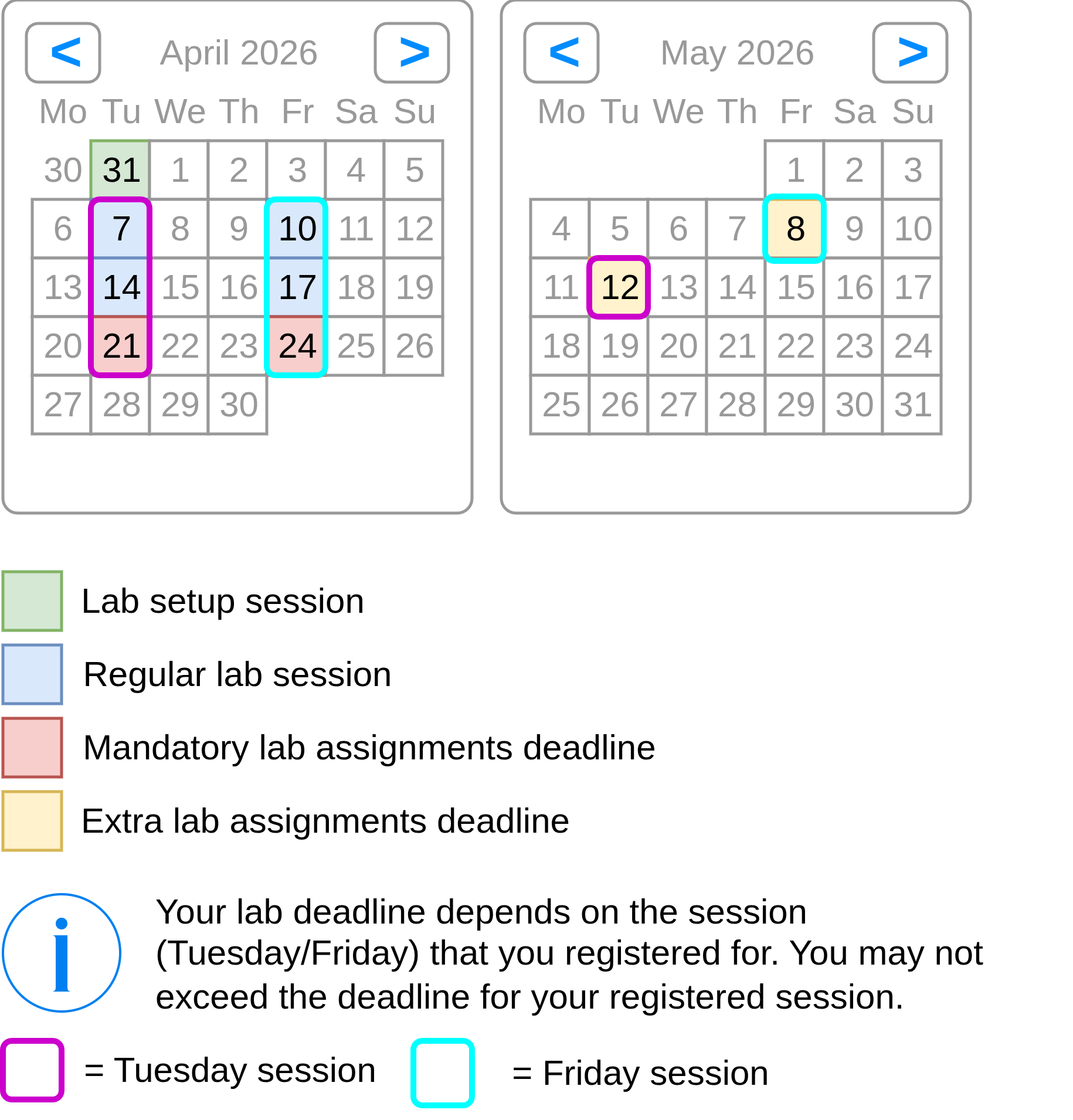
You may join sessions that you are not registered for, but with a no priority status. See Lab queue priority & load for more details.
Deadlines#
The deadlines for the lab assignments are strict. You cannot pass the course if you miss any of the deadlines for the mandatory assignments.
The deadlines for completing lab assignments differ depending on the lab session you are registered for. Please note the difference between the Canvas assignment deadline (i.e., the deadline for submitting your code to CodeGrade) and the lab interview deadline (i.e., the deadline for getting your assignment approved by a TA during the lab sessions). If you are registered for the Tuesday lab, you have to adhere to the Tuesday lab deadlines, and if you are registered for the Friday lab, you have to adhere to the Friday lab deadlines. To pass an assignment, you must both submit your code to CodeGrade and get it approved by a TA during the lab sessions before the respective deadlines.
The following are the deadlines for submitting your lab assignments on CodeGrade and getting them approved by a TA during the lab sessions:
Tuesday Lab#
- Mandatory A1: Chat Client and A2: TCP Trace Analysis — Tuesday, 21st of April, 12:45
- Optional All bonus lab assignments — Tuesday, 12th of May, 12:45
Friday Lab#
- Mandatory A1: Chat Client and A2: TCP Trace Analysis — Friday, 24th of April, 12:45
- Optional All bonus lab assignments — Friday, 8th of May, 12:45
Lab queue#
We use a lab queue to manage the support requests during the lab sessions. You may ask for help with your assignments during the lab sessions by joining the lab queue. For simple questions, you may directly ask the TAs for help without joining the queue. For more complex questions, or anything that requires a TA to look at your code, you need to join the queue.
In order to initiate a hand-in for any assignment (interview for passing the assignment), you also need to join the lab queue, selecting the Hand-In request option. When working on a group, only one person should join the queue for the hand-in; do not switch between the two teammates for hand-in requests, as this will potentially lead to ignored queue entries.
You may only join the lab queue with one request at a time. Any subsequent entries in the queue will be automatically removed, so you will need to re-join the queue once your current entry is resolved.
When joining a lab session that you are not registered for, you will be marked as No-Priority in the queue, meaning that you will only receive support after all the students registered for that session have been helped. It is possible (especially in busier weeks) that students registered for the session join the queue at a rate which will make it impossible for you to receive support during that session. If you find yourself waiting for more than 30 minutes, consider checking the lab room load (see button above) and joining the queue for the other room if it is significantly less busy.
During particularly busy weeks, we reserve the right to close the lab queue, regardless of priority status, up to 45 minutes before the end of the lab session, in order to ensure that all students in the queue will receive support—joining the lab earlier is encouraged. If the lab queue is closed, you will not be able to join the queue, and you will need to wait until the next lab session to receive support or hand-in your assignment (assuming that the deadline for your lab session has not passed yet). We announce the closure of the lab queue a few minutes in advance, as a last call for students to join the queue.
Submission procedure#
Every lab assignment must be approved by a teaching assistant in order to obtain the associated reward (points or a pass). You can hand in your assignments only during the Lab sessions. Before you have your assignment approved your code must (i) be submitted to CodeGrade through Canvas, (ii) pass all the CodeGrade tests, and you must join the lab queue. Additionally, in order to pass your code must be functionally and algorithmically correct, and needs to include proper documentation.
During the lab sign-off you must be able to explain your code to one of the teaching assistants and answer their questions. Both team members need to be able to explain all parts of the code for hand-in.
Make sure to prepare for the sign-off. That means being knowledgeable about all parts (even if they were written by your partner) of your solution, possibly adding further comments to help your explanation, and making sure that any leftover pieces of code from previous approaches are properly removed. Notably, we will also ask questions about the Python syntax you use, how the libraries you use work, and the algorithms you implement, besides the expected networking concepts related to the assignment.
You have limited attempts to sign-off your assignment!
- Each mandatory assignment allows for at most 2 attempts to sign-off.
- Each optional assignment allows for at most 3 attempts to sign-off.
If you run out of attempts, you will not be able to receive credit for the assignment anymore. In the case of mandatory assignments, this also implies failing the course. You may request aborting an attempt before any interview questions are asked. Aborting an attempt will not count towards the total. Please note that aborting an attempt is an exceptional request that may or may not be granted.
Lab session etiquette#
Before asking a question during the Lab, we expect you to have read the manual, including the associated book chapters. If you are unable to answer the question with these resources you are free to ask a TA, but please refrain from asking questions that you can answer yourself to allow other students to better use the available time with the TAs.
Lab Grading#
You can earn up to 4200 points in the labs. You may earn additional points by submitting exceptional solutions to the optional lab assignments.
You are rewarded 500 points for completing the mandatory lab assignments and having (both of) them approved by a teaching assistant before the deadline. Completing both mandatory lab assignments in the first week of the course (April 7th & 10th for the Tuesday and Friday registrations respectively) will earn you an additional 150 points.
You can earn up to 1000 additional points by completing optional lab assignments, totalling 3700 available extra points. The optional lab assignments are designed to encourage you to explore the course material in depth and to apply your knowledge to solve challenging problems. The rewarded points are directly proportional to the difficulty of the assignment. Exceptional solutions to the optional lab assignments may earn you additional points, up to a maximum of 200 points per assignment.